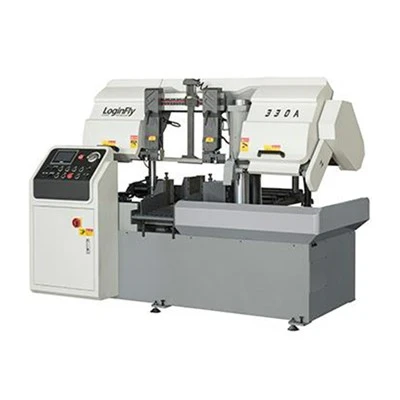
Hey there, let’s cut through the noise here—if you’re new to running a metal cutting band saw with a digital display, you might feel like you’re staring at a tiny screen full of jumbled numbers when you first turn it on. As a band saw supplier who’s worked with shops big and small for years, I’ve seen way too many folks skip the basic steps and end up with bent blades, messed-up cuts, or even worse, a machine that’s out of commission before lunch. Today, I’m walking you through exactly how to operate this thing like a pro, no fancy tech degree required. Metal Cutting Band Saw

First off, let’s keep this real: digital displays on band saws aren’t there to confuse you—they’re designed to take the guesswork out of cutting metal. Back in the day, you’d have to adjust blade speed, feed rate, and cut length with cranks and trial and error, which wasted so much material if you messed up. Now, that screen does most of the heavy lifting—you just need to know what each setting actually does, and how to lock it in so you don’t accidentally nudge it mid-cut. Let’s start with pre-operation checks, because even a $5k machine will mess up if you skip these.
Before you even power on the digital display, do a quick walkaround. Grab the blade and make sure it’s tight—if it’s loose, it’ll wobble like that one friend who can’t sit still at a dinner table, and you’ll get a jagged cut every time. Then, check the blade tension gauge (some digital displays even have a tension alert now, but don’t rely solely on that) to make sure it’s set for the metal you’re cutting. For mild steel, I usually run tension around 22,000 PSI, but if you’re cutting stainless or hardened steel, bump that up to 28,000 PSI—too loose and the blade breaks, too tight and it snaps prematurely, trust me, I’ve replaced more blades than I can count because of that mistake.
Next, power on the display. It’ll probably boot up to a home screen with a few main tabs: Blade Speed, Feed Rate, Cut Length, and maybe a Material Type preset. Let’s break each of these down, because this is where most newbies go wrong. Blade speed is non-negotiable—cutting soft metal (like aluminum) at a slow speed is like using a butter knife to cut steak; it’ll just gum up the blade and leave weird residue. Digital displays make this easy: most have presets, but if you’re going manual, aim for 80-100 surface feet per minute (SFPM) for stainless, 100-120 for mild steel, and 150-200 for aluminum. The screen will show SFPM, so you can twist the speed knob until it hits that number—no guessing with a tachometer anymore.
Feed rate is the other big one. This controls how fast the saw head pushes down on the metal, and it’s just as important as speed. Too high, and you’ll overload the blade, snap it, or have it veer off course. Too low, and you’ll spend twice as long on a cut, and the blade will overheat. For most small to medium shops, I set feed rate between 0.02 and 0.04 inches per minute for mild steel, 0.01 to 0.02 for stainless. The digital display will have a feed rate number, so adjust it with the little buttons until you’re in that range—if your machine has a “feed lock” feature, use it here so you don’t accidentally bump the knob while loading metal.
Now, cut length. This is where the digital display really shines, especially if you’re doing repetitive cuts. Let’s say you need 12-inch pieces of steel for a project. Instead of measuring each one and marking it, you can input the exact cut length into the display, set it to “repeat cut,” and the machine will stop automatically when each piece is done. But here’s the hack: make sure you account for the kerf— that’s the thin strip of metal the blade cuts away. If you don’t add a 1/8-inch kerf allowance (most digital displays will even calculate this for you if you input blade width), your pieces will end up slightly shorter than you need. I learned this the hard way when a shop ordered 50 pieces, all 12 inches, and I forgot the kerf—they were 11 7/8 inches, and the client had to send them back. Oops.
Once you’ve set all those numbers, it’s time to load the metal. Don’t just clamp it down anywhere—align it with the cut line, and make sure the vise is tight. If the metal moves even a tiny bit during the cut, you’ll get a crooked edge, and you’ll have to spend time grinding it later. The digital display might have a “zero position” function for the cut length, so you can set the starting point right where you want it—just press that button when the blade is hovering over the start mark, and the display will lock in the zero, so you don’t have to manually measure every time.
Now, the actual cut. Before you hit “start,” do a test run—most digital band saws have a jog button that lets you move the saw head down slowly without engaging the blade. Use that to make sure the blade is lined up perfectly with the mark, and the feed rate isn’t too high. Once you’re sure, hit start. The display will show real-time data: how fast the blade is spinning, how much feed rate you’re using, and even the time left for the cut. If you notice the blade starting to smoke, that’s a red flag—either your speed is too slow, or your feed rate is too high, so hit the emergency stop (don’t try to adjust the settings mid-cut, that’s how you get hurt).
Wait, let’s talk about safety here, because this isn’t just a tutorial—it’s a reminder. Digital displays make operating these machines feel like video games, but they’re still heavy metal tools. Always wear eye protection, gloves (not the fuzzy kind, work gloves), and make sure the area around the saw is clear of scrap metal or sawdust. The digital display will have safety locks, but don’t rely on them to keep you safe—always double-check the blade guard is down, and your hands are at least 6 inches away from the blade when it’s moving.
Now, what about when you’re done? Don’t just turn off the machine and walk away. The digital display will have a “clean cycle” or “blade rest” function—use that to move the saw head up to the top position, and turn off the power. Then, wipe down the blade with a metal-safe cleaner to remove any coolant or residue, and check the blade tension again to make sure it’s not too tight when the machine is off. A lot of people skip this, but it’ll extend your blade life by months—saving you money in the long run, which is a win for any shop.
Let’s wrap this up with a quick troubleshooting section, because even with a digital display, things go wrong. If the cut is jagged, check blade tension first—9 times out of 10, that’s the issue. If the display is glitching, make sure the machine is plugged in securely, and the screen isn’t dirty (a little dust on the display can make numbers hard to read). If the blade keeps veering off course, your feed rate is probably too high, or the metal isn’t clamped tight enough. I’ve fixed all of these issues so many times, it’s like second nature now.
Look, here’s the thing: a digital display on a band saw isn’t some fancy toy—it’s a tool designed to make your work easier, not harder. You don’t need to memorize every setting, just stick to the basics: check tension, set the right speed and feed rate, add kerf allowance, and clamp that metal tight. I’ve worked with small shops that just got their first digital band saw, and they went from wasting 20% of their metal to wasting less than 5%—that’s a game-changer for profit margins.
If you’re still on the fence about upgrading to a digital display band saw, or you have questions about troubleshooting yours, feel free to reach out. We’ve helped hundreds of shops get the most out of their machines, and we’re here to walk you through every step, even if it’s just over a quick call. Don’t let that tiny screen intimidate you—once you get the hang of it, you’ll wonder how you ever operated a band saw without it.
Metal Cutting Band Saw References:
- Machinery’s Handbook, 31st Edition: Metal Cutting Band Saw Operation and Maintenance, Industrial Press Inc., 2020.
- American Saw & Manufacturing Association: Best Practices for Digital Band Saw Setup, ASMA Guidelines, 2022.
- Modern Machine Shop: How Digital Controls Reduce Material Waste in Metal Cutting, Endeavor Business Media, 2021.
Shanghai Loginfly Sawing Technology Co., Ltd.
As one of the most professional metal cutting band saw manufacturers and suppliers in China, our products have good reputation in the market. We warmly welcome you to wholesale premium metal cutting band saw from our factory. If you have any enquiry about cooperation, please feel free to email us.
Address: Room 506 NO.655 Yinxiang Road,Nanxiangtown,Jiading District, Shanghai.China
E-mail: sales01@loginfly.com
WebSite: https://www.loginflysaws.com/
